Notice
Recent Posts
Recent Comments
Link
| 일 | 월 | 화 | 수 | 목 | 금 | 토 |
|---|---|---|---|---|---|---|
| 1 | 2 | 3 | 4 | 5 | 6 | 7 |
| 8 | 9 | 10 | 11 | 12 | 13 | 14 |
| 15 | 16 | 17 | 18 | 19 | 20 | 21 |
| 22 | 23 | 24 | 25 | 26 | 27 | 28 |
| 29 | 30 | 31 |
Tags
- AlexNet
- NLP
- CNN
- hm3dsem
- hm3d
- MySQL
- LSTM
- machine learning
- opencv
- RL
- dynamic programming
- BFS
- C++
- YoLO
- Reinforcement Learning
- 머신러닝
- deep learning
- Python
- dfs
- ubuntu
- DP
- image processing
- GIT
- UC Berkeley
- 딥러닝
- 백준
- 그래프 이론
- r-cnn
- 강화학습
- CS285
Archives
- Today
- Total
JINWOOJUNG
[GIT] Github에 올라간 파일 삭제 본문
728x90
반응형
Background
Git을 통해 협업을 하다 보면 파일을 잘못 올리거나, 이미 push 해서 작업 중인 파일을 삭제하고 싶은 경우가 있을 것이다. 혹은 dev 에서 작업을 하다가 main에는 해당 파일을 제외하고 올리고 싶을 수도 있다. 그럴 때 활용할 수 있는 git 명령어를 살펴보자.
원격 저장소에 올라간 파일 삭제: 로컬 유지, 원격 삭제
다음과 같이 main branch에 private 폴더를 잘못 올렸다고 가정하자. dev에서 개발할 때 필요한 자료들이 실수로 올라간 상황이다. 우리는 dev branch(로컬 저장소)에는 유지하고 main branch(원격 저장소)에는 삭제하길 원한다.
jinwoo@jinwoo-System-Product-Name:~/test$ ls
README.md  private  test1.py  test2.py
jinwoo@jinwoo-System-Product-Name:~/test$ git log --all
commit 8f633c1c47e7aff02c97ff244b50785d2f54ae09 (HEAD -> main, origin/main, origin/HEAD, dev)
Author: Jinwoo <wjdwlsdn8520@gmail.com>
Date:   Fri Dec 19 11:50:19 2025 +0900

    remove test
먼저 git rm --cached 명령어를 통해 로컬에서는 유지하고, main branch에서의 GIT 추적 리스트에서만 제거한다. 현재 main branch이기 때문에 바로 실행했지만, dev branch이면 git checkout 명령어를 통해 main branch로 변환해야 한다.
jinwoo@jinwoo-System-Product-Name:~/test$ git rm --cached -r private
rm 'private/test.log'
우리는 거의 대부분 git add . 명령어를 통해 변환된 모든 파일을 올린다. 하지만 이렇게 되면 또 다시 private 폴더가 올라가므로 이를 방지하기 위해 .gitignore을 활용하자. .gitignore이란 GIT이 ignore해야 할 파일들을 저장된 목록을 의미한다.
jinwoo@jinwoo-System-Product-Name:~/test$ echo "private/" >> .gitignore
jinwoo@jinwoo-System-Product-Name:~/test$ git add .gitignore
jinwoo@jinwoo-System-Product-Name:~/test$ git commit -m "add .gitignore"
[main d149dde] add .gitignore
 2 files changed, 1 insertion(+), 1 deletion(-)
 create mode 100644 .gitignore
 delete mode 100644 private/test.log
jinwoo@jinwoo-System-Product-Name:~/test$ git push
오브젝트 나열하는 중: 4, 완료.
오브젝트 개수 세는 중: 100% (4/4), 완료.
Delta compression using up to 16 threads
오브젝트 압축하는 중: 100% (2/2), 완료.
오브젝트 쓰는 중: 100% (3/3), 346 바이트 | 346.00 KiB/s, 완료.
Total 3 (delta 0), reused 0 (delta 0), pack-reused 0
To https://github.com/Jinwoo-Jung01/test.git
   8f633c1..d149dde  main -> main
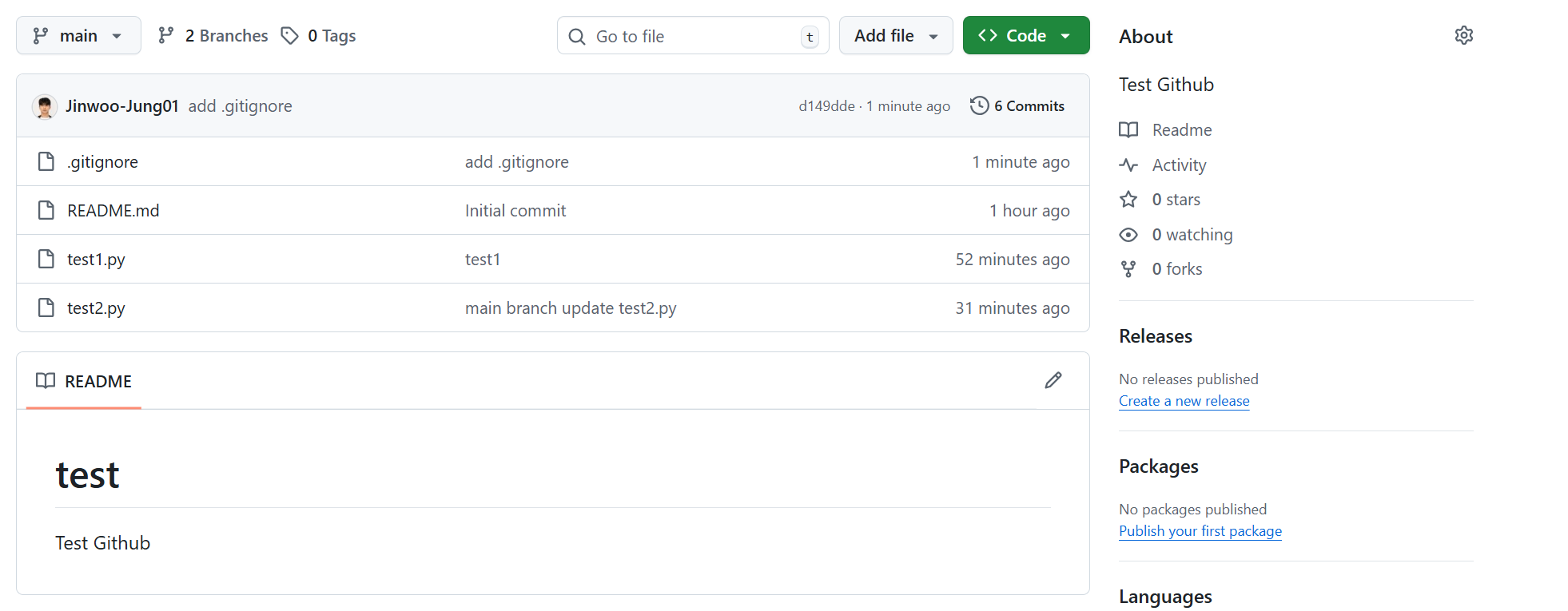
실제 로컬에는 남아있지만, GIT에서는 삭제됨을 확인할 수 있다.
jinwoo@jinwoo-System-Product-Name:~/test$ ls
README.md  private  test1.py  test2.py
728x90
반응형
'Git' 카테고리의 다른 글
| [GIT] dev branch 생성 및 main branch 병합 (0) | 2025.12.19 |
|---|---|
| [GIT] Git/GitHub (1) | 2025.04.11 |
'Git' Related Articles
more

